But I'm happy with the purchase, nonetheless. I'm certain that it has Complicated White Alps and some double-shots, so it wouldn't be a bad purchase if it doesn't work. My question is, could I use a PS/2 cable from an old rubber dome keyboard as a replacement for the broken AT cable? The cable connector on the PCB differs between an AT cable and a PS/2 cable, so I'll probably have to solder the PS/2 cable to the PCB.
Replacing a cut-off AT cable with a PS/2 cable: is it doable?
- keycap
- Location: United States
- Main keyboard: '88 Model M, DFK777 SKCM Blue
- Main mouse: A paperclip and a string
- Favorite switch: Alps SKCM, IBM buckling spring
- DT Pro Member: -
So I recently bought a White Alps keyboard for a great price of $15, but the drawback is that its cable is cut off. I don't know who in their right mind would cut it off of such a nice keyboard... 
But I'm happy with the purchase, nonetheless. I'm certain that it has Complicated White Alps and some double-shots, so it wouldn't be a bad purchase if it doesn't work. My question is, could I use a PS/2 cable from an old rubber dome keyboard as a replacement for the broken AT cable? The cable connector on the PCB differs between an AT cable and a PS/2 cable, so I'll probably have to solder the PS/2 cable to the PCB.
- XMIT
- [ XMIT ]
- Location: Austin, TX area
- Main keyboard: XMIT Hall Effect
- Main mouse: CST L-Trac Trackball
- Favorite switch: XMIT 60g Tactile Hall Effect
- DT Pro Member: 0093
In short, yes, this is doable. The cables are often cut for copper scrap.
Both the AT and PS2 connectors have four pins that you need to worry about: power and ground, data and clock. Of these two it is most critical to get power and ground right or else you will fry your keyboard's controller.
You'll need a multimeter with continuity tester, ohm meter, or some other way of testing for continuity.
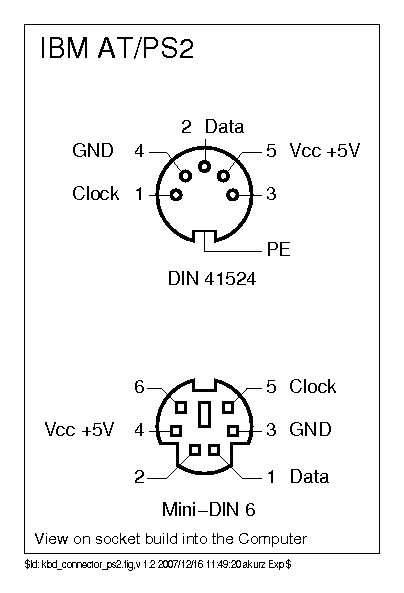
Here are the connector pinouts:

To figure out power and ground: find an integrated circuit (IC) on the keyboard's PCB, Google around for the data sheet to figure out which is power and ground, and figure out which pins will be power and ground on the PCB's connector.
DO NOT rely on individual wire colors to tell you anything!
Good luck...
Both the AT and PS2 connectors have four pins that you need to worry about: power and ground, data and clock. Of these two it is most critical to get power and ground right or else you will fry your keyboard's controller.
You'll need a multimeter with continuity tester, ohm meter, or some other way of testing for continuity.
Here are the connector pinouts:

To figure out power and ground: find an integrated circuit (IC) on the keyboard's PCB, Google around for the data sheet to figure out which is power and ground, and figure out which pins will be power and ground on the PCB's connector.
DO NOT rely on individual wire colors to tell you anything!
Good luck...