Siemens F500
-
takospite
- Location: Hungary
- DT Pro Member: -
Seems brand new and original packaged. I really would like to use it, unfortunately it is do not works with my din to minidin adapter, maybe you guys helps me figures out a way : )
- Attachments
-
- 1.jpg (856.86 KiB) Viewed 15910 times
-
- 3.jpg (1009.09 KiB) Viewed 15910 times
-
- 2.jpg (1.34 MiB) Viewed 15910 times
-
- 6.jpg (1.25 MiB) Viewed 15910 times
-
- 5.jpg (1.32 MiB) Viewed 15910 times
-
- 4.jpg (1.18 MiB) Viewed 15910 times
-
OleVoip

- Location: Hamburg
- Main keyboard: Tandberg TDV-5010
- Main mouse: Wacom Pen & Touch
- Favorite switch: Siemens STB 21
- DT Pro Member: -
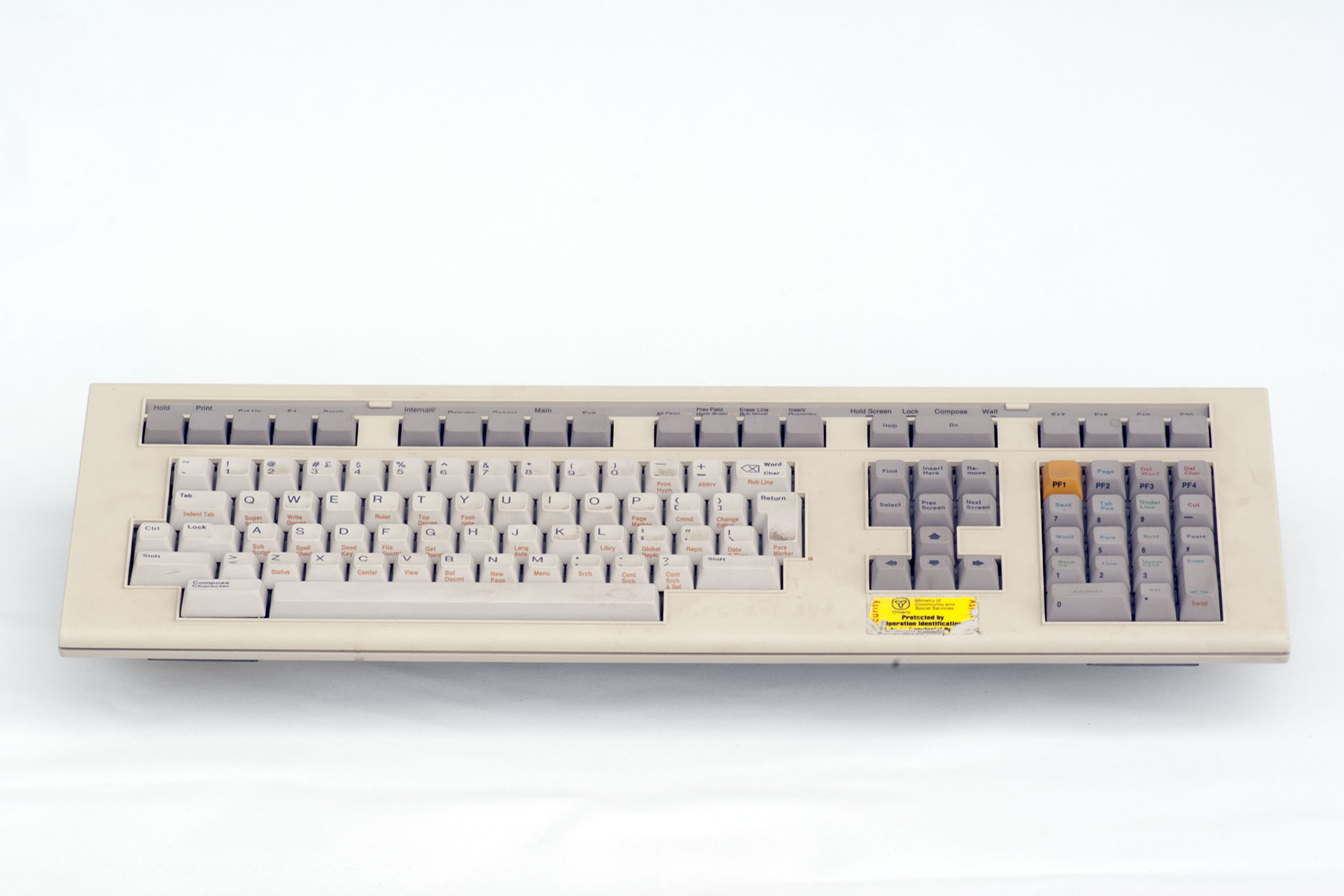
This keyboard was made by Falco for their F500 terminal, which was sold by Siemens as an operator's terminal for their HICOM 300-series telephone exchanges around 1990. Here you can find photos of it
- Falco branding: http://bitsavers.trailing-edge.com/pdf/ ... /pictures/
- Siemens branding: http://www.retrocomputing.net/parts/SIEMENS/F500/
-
OleVoip
- Location: Hamburg
- Main keyboard: Tandberg TDV-5010
- Main mouse: Wacom Pen & Touch
- Favorite switch: Siemens STB 21
- DT Pro Member: -
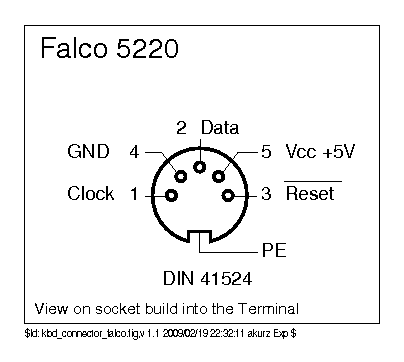
I new, I've seen it somewhere, but now I remember, kbdbabel has the pinout:
http://www.kbdbabel.org/conn/kbd_connector_falco.png
Note that the scan codes are likely to need remapping.
http://www.kbdbabel.org/conn/kbd_connector_falco.png
Note that the scan codes are likely to need remapping.
-
BadCommand

- Location: USA - CA
- Main keyboard: IBM Model F AT
- Main mouse: CST
- Favorite switch: capacitive buckling spring
Hi there, first post here. Sorry for the necro, but I've got a similar keyboard from the Falco 500 series. From the Quick Setup Manual 1987 (up two directories from the bitsavers link in OleVoip's post) it looks like Falco offered a couple different layouts. I saw this discussion on GH regarding a Falco 5220 keyboard with Cherry MX blacks like yours, and thought it interesting that mine had Hosiden linear switches, ~50 g actuation, ~60 g bottom out. They are very smooth even when dirty and well-used. Only the return, shift keys, and spacebar are stabilized (the others are stepped). The keycaps are pretty nice PBT (except for the spacebar) with dye-sub legends that I've seen on some other terminal boards here on DT. It uses the XT protocol and works well with a Soarer's converter.
- Attachments
-
- 1.jpg (1.2 MiB) Viewed 15330 times
-
- 2.jpg (760.34 KiB) Viewed 15330 times
-
- 3.jpg (2.1 MiB) Viewed 15330 times
-
takospite
- Location: Hungary
- DT Pro Member: -
Is it work with a passive minidin converter?BadCommand wrote: 20 Apr 2020, 14:36 Hi there, first post here. Sorry for the necro, but I've got a similar keyboard from the Falco 500 series. From the Quick Setup Manual 1987 (up two directories from the bitsavers link in OleVoip's post) it looks like Falco offered a couple different layouts. I saw this discussion on GH regarding a Falco 5220 keyboard with Cherry MX blacks like yours, and thought it interesting that mine had Hosiden linear switches, ~50 g actuation, ~60 g bottom out. They are very smooth even when dirty and well-used. Only the return, shift keys, and spacebar are stabilized (the others are stepped). The keycaps are pretty nice PBT (except for the spacebar) with dye-sub legends that I've seen on some other terminal boards here on DT. It uses the XT protocol and works well with a Soarer's converter.
-
BadCommand
- Location: USA - CA
- Main keyboard: IBM Model F AT
- Main mouse: CST
- Favorite switch: capacitive buckling spring
I'm afraid that it will not work directly with a modern computer since the protocol is XT, not AT. You'll need an active converter.
-
mikhail

- Location: Moscow
- Main keyboard: Custom
- Main mouse: Apple magic trackpad
- Favorite switch: Durock POM
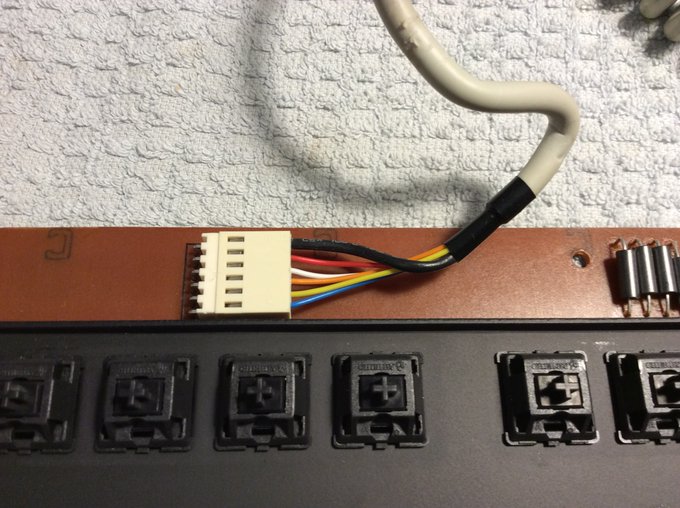
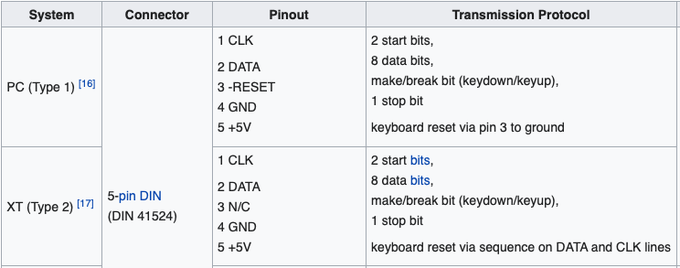
Hello! I have same Siemens F500 keyboard, and ready to purchase an XT-converter, but, i think about strange 5 (without chassis ground) wires in the connector. What if it's not XT?BadCommand wrote: 06 Sep 2020, 12:21 I'm afraid that it will not work directly with a modern computer since the protocol is XT, not AT. You'll need an active converter.
Or it's PC (Type 1) with -reset pin? Will XT adapters work with this?
-
BadCommand
- Location: USA - CA
- Main keyboard: IBM Model F AT
- Main mouse: CST
- Favorite switch: capacitive buckling spring
I haven't got better pictures at the moment but mine looks similar. I'll let the protocol specialists add the details.
- Attachments
-
- P_20190212_164506.jpg (2.45 MiB) Viewed 14683 times
-
- P_20190216_140929.jpg (3.68 MiB) Viewed 14683 times
-
hellothere

- Location: Mesa, AZ USA
- Main keyboard: Lots
- Main mouse: CST2545W-RC
- Favorite switch: TopreAlpsHallEffectTopreAlpsHallEffectTopreAlps
I bought a keyboard from Redmaus, opened it up and it's a 1987 Falco 5220 keyboard. It's a really interesting keyboard. The switches are USw LMBW01 and 02. Linear. A Cherry-mount keycap will fit, albeit a little snugly. Metal mounting plate.
I bought the keyboard because I had initially thought (and it was advertised by Redmaus as) having Mitsumi Miniature Mechanical switches, which I've never tried. It was a bonus to find out that it had rare/uncommon switches.
I do have a question for the group. If you look at the keyboard's "main" QWERTY sections, you see (dirty) white key caps next to (dirty) yellowed caps and all the white keys have the brown legends printed on the side. Is it possible that the white keys are PBT and the yellowed ones are ABS?
BTW, I think I bought the other keyboard Redmaus had with the same switches. Hey, I needed a complete set of key caps.
FWIW, I did try to connect this to my 90-degree 5-pin DIN Soarer's Converter. It didn't work, neither did a 5 pin DIN to PS/2 adapter. I'm going to be getting a few Pro Micros in, soon, and I'll see if I can make an adapter that works.
As I'm not fond of linear switches, I'll make the two keyboards into one complete one and then probably post here. Maybe send the other one to Chyros?
The below pics were taken with a potato. Not that a better camera would do me any good.
Missing a couple caps.
Definitely a Falco.
Pretty keys.
Terminal keys
Ma! Can you take me down to the libry?
Dead key. Just in time for Halloween.
I bought the keyboard because I had initially thought (and it was advertised by Redmaus as) having Mitsumi Miniature Mechanical switches, which I've never tried. It was a bonus to find out that it had rare/uncommon switches.
I do have a question for the group. If you look at the keyboard's "main" QWERTY sections, you see (dirty) white key caps next to (dirty) yellowed caps and all the white keys have the brown legends printed on the side. Is it possible that the white keys are PBT and the yellowed ones are ABS?
BTW, I think I bought the other keyboard Redmaus had with the same switches. Hey, I needed a complete set of key caps.
FWIW, I did try to connect this to my 90-degree 5-pin DIN Soarer's Converter. It didn't work, neither did a 5 pin DIN to PS/2 adapter. I'm going to be getting a few Pro Micros in, soon, and I'll see if I can make an adapter that works.
As I'm not fond of linear switches, I'll make the two keyboards into one complete one and then probably post here. Maybe send the other one to Chyros?
The below pics were taken with a potato. Not that a better camera would do me any good.
Spoiler:
Spoiler:
Spoiler:
Spoiler:
Spoiler:
Spoiler:
Spoiler:
Spoiler:
Spoiler:
Spoiler:
Spoiler:
Spoiler:
-
BadCommand
- Location: USA - CA
- Main keyboard: IBM Model F AT
- Main mouse: CST
- Favorite switch: capacitive buckling spring
Nice keyboard, looks kind of familiar  The case on mine seems to have come from the same mold. I'm surprised to see how many different switches Falco used.
I've seen differing degrees of yellowing on ABS keys on the same keyboard before, but in this case I think you are right that the keys with print on the front are PBT. It seems to have been common practice to mix plastics and/or print methods if necessary. I don't think they expected the ABS to yellow so much, or maybe for their keyboards to still be in use 35 years later...
Hope you can get it back into service!
The case on mine seems to have come from the same mold. I'm surprised to see how many different switches Falco used. I've seen differing degrees of yellowing on ABS keys on the same keyboard before, but in this case I think you are right that the keys with print on the front are PBT. It seems to have been common practice to mix plastics and/or print methods if necessary. I don't think they expected the ABS to yellow so much, or maybe for their keyboards to still be in use 35 years later...
Hope you can get it back into service!
- Attachments
-
- IMG_20201017_170528.jpg (2.91 MiB) Viewed 14437 times
-
BadCommand
- Location: USA - CA
- Main keyboard: IBM Model F AT
- Main mouse: CST
- Favorite switch: capacitive buckling spring
Also I am wondering what color that PF1 key really is! That numpad is a looker.
-
hellothere
- Location: Mesa, AZ USA
- Main keyboard: Lots
- Main mouse: CST2545W-RC
- Favorite switch: TopreAlpsHallEffectTopreAlpsHallEffectTopreAlps
It was completely unintentional, but the picture really did come out good and the color you see is pretty much what it looks like in real life. I think it might lighten a bit if I decide to retr0bright it. I am a bit wary of using retr0bright because I saw a comment on the original thread on these switches that said the printing on the caps might be silk screened. I've never retr0brighted silk screened keycaps.BadCommand wrote: 17 Oct 2020, 19:29 Also I am wondering what color that PF1 key really is! That numpad is a looker.
I also just got a Wang 724/725 (bought from another DeskThority member!) that has this beautiful num pad.

-
JensD
- Location: Germany
- Main keyboard: Desko
- Main mouse: Cherry MW8
- Favorite switch: Cherry MX Clear
Just a little question. There is a Siemens F500 on german eBay and it has Cherry MX black. Can I assume that these are vintage blacks?
https://www.ebay.de/itm/Retro-Mechanisc ... SwuNVfHwQc
https://www.ebay.de/itm/Retro-Mechanisc ... SwuNVfHwQc
-
hellothere
- Location: Mesa, AZ USA
- Main keyboard: Lots
- Main mouse: CST2545W-RC
- Favorite switch: TopreAlpsHallEffectTopreAlpsHallEffectTopreAlps
Cool. So, several shades brighter.
@JensD I know that the serial on the one on ebay is just a few off from the one in takospite's post, but I'm definitely not up on the dating of either Siemens keyboards or what the years were for "Cherry vintage black." However, the ebay one is probably around 1990, based on the other keyboards in this thread.
-
JensD
- Location: Germany
- Main keyboard: Desko
- Main mouse: Cherry MW8
- Favorite switch: Cherry MX Clear
Thanks for your advice. So I guess chances are quite good that is has vintage blacks and then the price would be ok. Need to think over it...hellothere wrote: 19 Oct 2020, 00:30 @JensD I know that the serial on the one on ebay is just a few off from the one in takospite's post, but I'm definitely not up on the dating of either Siemens keyboards or what the years were for "Cherry vintage black." However, the ebay one is probably around 1990, based on the other keyboards in this thread.
-
JensD
- Location: Germany
- Main keyboard: Desko
- Main mouse: Cherry MW8
- Favorite switch: Cherry MX Clear
I couldn't resist and bought the keyboard. Overall, it's nice, but there are downsides too.
Pros:
- build quality is good, heavy and very rigid
- I like MX black in general. Linear is right for me.
- typing is fun, I reach high speeds.
Cons:
- the keys are scratchy, I have no comparison but I would like to rule out that these are vintage MX blacks. They are even worse than my new MX Blacks.
- the keys are hard to press, quite stiff. Way stiffer than my new MX Black.
- some keys are very sensitive to off center press, similar to Cherry MY. They feel mushy when pressed off center. Often the key press is not recognized. This applies especially for the wider keys.
- the key sound is quite high, not as deep and pleasant as MX clear.
- the stabilizers are really bad and some even squeak.
- due to the metal mounting plate, the keyboard makes metallic noises when the keys bottom out.
- it often does not work when connected to the computer. If you reconnect it repeatedly, it will work at some point.
- due to the platemount, I cannot mod the stabilizers (clip, lube, band aid)
- the platemout makes it harder or even impossible to mod the keys (swap spring, lubing, swap stem)
- the keycaps are really bad, seem to be printed, not even laser print. Cheap plastic some are yellowed.
- the distance between the stabilizers for the space bar is not compatible with Cherry. This means that no other space bar can be used.
- the additional key "Term Func" cannot be used, does not trigger a keypress
Pros:
- build quality is good, heavy and very rigid
- I like MX black in general. Linear is right for me.
- typing is fun, I reach high speeds.
Cons:
- the keys are scratchy, I have no comparison but I would like to rule out that these are vintage MX blacks. They are even worse than my new MX Blacks.
- the keys are hard to press, quite stiff. Way stiffer than my new MX Black.
- some keys are very sensitive to off center press, similar to Cherry MY. They feel mushy when pressed off center. Often the key press is not recognized. This applies especially for the wider keys.
- the key sound is quite high, not as deep and pleasant as MX clear.
- the stabilizers are really bad and some even squeak.
- due to the metal mounting plate, the keyboard makes metallic noises when the keys bottom out.
- it often does not work when connected to the computer. If you reconnect it repeatedly, it will work at some point.
- due to the platemount, I cannot mod the stabilizers (clip, lube, band aid)
- the platemout makes it harder or even impossible to mod the keys (swap spring, lubing, swap stem)
- the keycaps are really bad, seem to be printed, not even laser print. Cheap plastic some are yellowed.
- the distance between the stabilizers for the space bar is not compatible with Cherry. This means that no other space bar can be used.
- the additional key "Term Func" cannot be used, does not trigger a keypress
- Attachments
-
- IMG_20201106_064314.jpg (3.22 MiB) Viewed 14062 times
-
- IMG_20201106_064340.jpg (4.03 MiB) Viewed 14062 times
-
- IMG_20201106_070641.jpg (2.8 MiB) Viewed 14062 times
-
- IMG_20201106_064420.jpg (2.56 MiB) Viewed 14062 times
-
- IMG_20201106_064408.jpg (2.36 MiB) Viewed 14062 times
-
- siemens.png (65.4 KiB) Viewed 14062 times
-
rhaberkorn
- Location: Germany
- Main keyboard: Robotron K7637
- Favorite switch: IBM Buckling Spring
- Contact:
I also bought one of those keyboards, where somebody already desoldered the switches. Seems like a good starting point for a custom build with new switches and keycaps. Unfortunately the previous owner removed the stabilizer on "+" which does not seem to be plate-mounted. Could you tell me what kind of stabilizer this is? Some kind of clip-in PCB-mount?JensD wrote: 06 Nov 2020, 09:42 - the stabilizers are really bad and some even squeak.
- due to the metal mounting plate, the keyboard makes metallic noises when the keys bottom out.
Is this a standard AT DIN connector?
-
rhaberkorn
- Location: Germany
- Main keyboard: Robotron K7637
- Favorite switch: IBM Buckling Spring
- Contact:
I would add to this list that it has a 7u spacebar, which complicates replacing the keycaps. In my case, I wanted to install MT3 keycaps. Good luck finding a MT3 or SA 7u space bar. I am already thinking about 3d-printing one...
-
mmm

- Location: Denmark
- Main keyboard: 34-key split keyboard / F122
- Main mouse: Mx Ergo / Trackpad
- Favorite switch: Cap bs
Almost all modern keycap sets has a 7u spacebar. There are a few mt3 dev/tty with minimal kitting that supports just one layout, but besides these I think most, if not all, mt3 kits includes a 7u spacebar.rhaberkorn wrote: 02 Jun 2023, 14:28I would add to this list that it has a 7u spacebar, which complicates replacing the keycaps. In my case, I wanted to install MT3 keycaps. Good luck finding a MT3 or SA 7u space bar. I am already thinking about 3d-printing one...
-
rhaberkorn
- Location: Germany
- Main keyboard: Robotron K7637
- Favorite switch: IBM Buckling Spring
- Contact:
I bought mine aftermarket, so I am not sure if it originally came with a 7u spacebar or not (the previous owner might have removed it). But I don't think it did. I designed a key with KeyV2 and will try to print that if not too expensive.
I have also soldered in keys and hacked together a converter. I am using Soarer's for the time being.
The keyboard identifies as an XT (set 1). The good news is that all keys actually respond uniquely - including the weird one next to the lock lights.
The bad news is, that it's protocol seems to be non-standard. Some of the keys (nav cluster, the cluster above with INS/DEL etc, RALT, RCTL) use the E0-prefix to discern them from other keys. For instance, the cursor keys are reported as numpad scancodes prefixed by E0. This is not properly handled by Soarer's Converter, which appears to simply discard the E0 prefix. Therefore there seems to be no way to remap these keys. Also Soarer's Converter apparently does not support putting the keyboard into another Scancode Set. I don't know if that would help, but it would be worth a try.
Also at least on set 1, you cannot control the led lights from your OS, ie. the keyboard manages these lights on its own. This is relevant if you, like me, use to remap Caps-Lock to CTRL, as otherwise the Caps Lock LED toggles every time you press CTRL. I don't know if Soarer actually tries to send the corresponding commands to the keyboard's controller and the controller ignores them or what. So that needs to be investigated.
I will therefore *sigh* have to fork the tmk XT (or AT) converter and try to get that working. Results will be on my Github. But it is definitely possible to properly convert this keyboard.


-
rhaberkorn
- Location: Germany
- Main keyboard: Robotron K7637
- Favorite switch: IBM Buckling Spring
- Contact:
I can report success with the firmware. I tried tmk's ibmpc_usb converter and it worked out of the box. Typing this from a F500.
The firmware performs a reset (FF) on startup. Afterwards the keyboard replies with ID AB83 and is apparently in Code Set 2.
All keys are reported properly and lock lights are OS-controlled.
I built my own firmware, but you should be able to use the Unimap editor and download a working firmware directly from the website (not tested).
The only disadvantage with the default TMK firmware is, that the "Term Func" key won't work as it uses non-standard scancodes. It actually "crashes" the TMK firmware. I have fixed this issue and will perhaps upstream a patch that maps this key to "Volume Down" by default (so it matches the geometry in the Unimap editor).
The firmware performs a reset (FF) on startup. Afterwards the keyboard replies with ID AB83 and is apparently in Code Set 2.
All keys are reported properly and lock lights are OS-controlled.
I built my own firmware, but you should be able to use the Unimap editor and download a working firmware directly from the website (not tested).
The only disadvantage with the default TMK firmware is, that the "Term Func" key won't work as it uses non-standard scancodes. It actually "crashes" the TMK firmware. I have fixed this issue and will perhaps upstream a patch that maps this key to "Volume Down" by default (so it matches the geometry in the Unimap editor).
-
Muirium

- µ
- Location: Edinburgh, Scotland
- Main keyboard: HHKB Type-S with Bluetooth by Hasu
- Main mouse: Apple Magic Mouse
- Favorite switch: Gotta Try 'Em All
- DT Pro Member: µ
This matches my own experience with TMK on converters. Build it yourself and it will work with the key map specified in source. But I haven’t ever gotten Unimap to work. Which is super annoying as it’s all I need, want or use with my Hasu-native HHKBs and Alps64.rhaberkorn wrote: 09 Jun 2023, 04:31 I built my own firmware, but you should be able to use the Unimap editor and download a working firmware directly from the website (not tested).
-
rhaberkorn
- Location: Germany
- Main keyboard: Robotron K7637
- Favorite switch: IBM Buckling Spring
- Contact:
Well, my custom build does work with the Unimap editor flawlessly. All of my TMK builds always did. I just uploaded my own firmware into the site instead of choosing an existing one.Muirium wrote: 09 Jun 2023, 11:21 This matches my own experience with TMK on converters. Build it yourself and it will work with the key map specified in source. But I haven’t ever gotten Unimap to work. Which is super annoying as it’s all I need, want or use with my Hasu-native HHKBs and Alps64.
Moreover, most converters and controllers should have Unimap enabled by default. Could you elaborate on what exactly you tried to do (perhaps in a separate thread and then ping me)? Or create a ticket on tmk_keyboard itself and I will try to respond there.
PS: TMK merge request created.